 British Wildlife 2
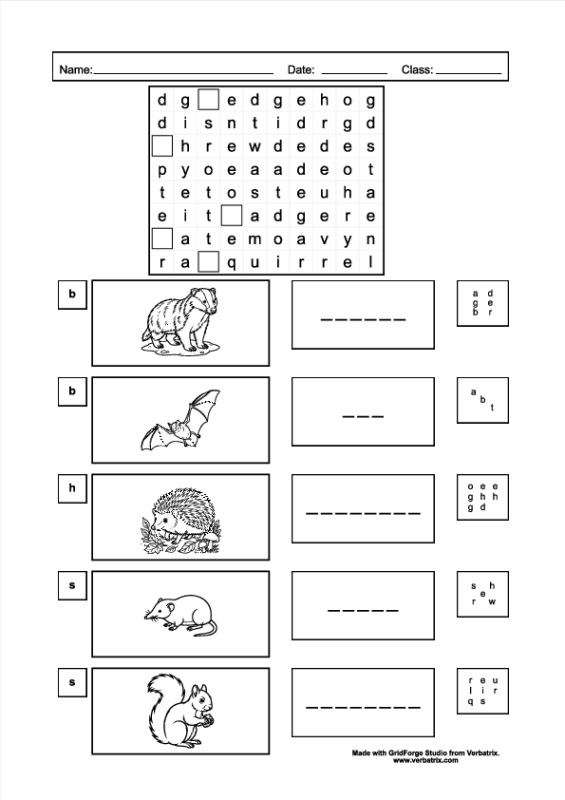
 Simple worksheet aimed at young children, incorporating a wordsearch with image, first letter and scrambled letters clues.
There are five animals featured in this worksheet: badger, bat, hedgehog, shrew and squirrel.
This worksheet uses GridForge Studio’s ability to remove the first letter in each word in a wordsearch puzzle, replacing them with a box to write in the missing letter. This is a nice scaffolding feature for children first encountering wordsearches. It signposts the locations of the words but still leaves them with processing to do. I have used four other worksheet elements: initial letter, image, write-in and spelling die.
The initial letter element displays the first letter from its assigned word. The image element allows the user to choose from the images referenced in the word library, or add their own bespoke image. The write-in element gives a variety of options to produce an area for the end user to write in on the sheet, for example solid line, lines per letter, box per letter. The spelling die element displays the letters from the assigned word in a pattern similar to the spots on a die. So in effect it is the same as the anagram element but the letters are displayed differently.
I have used black and white line drawing images to give the option for colouring if desired.
For a video showing how this worksheet was created check out the GridForge Studio Worksheet Creator Demonstration on our YouTube channel.
The worksheet creator in GridForge Studio has 28 element types, for more information and for a working demonstration version visit www.verbatrix.com, where you can also download sample worksheets and wordsearches, and play some sample html wordsearch exports.